

🧪 Lab Report #6: Parallel Compression for Real People — Get Bigger, Louder Mixes Without Killing Dynamics
Parallel compression isn’t a “secret sauce” — it’s a technique of balance. Learn how to blend punch and depth like the pros, using real-world settings that actually translate on MPCs, DAWs, and hybrid

What Is Parallel Compression (and Why It’s Different)
Most compression tutorials focus on control. Parallel compression is about energy — blending an uncompressed signal (for punch and transients) with a heavily compressed copy (for body and density).
Instead of taming the loud parts, you lift the quiet ones. Done right, it sounds big, exciting, and expensive — without crushing the groove.


Step 1 — Understand the Goal
Parallel compression is about perceived loudness.
You’re not just turning things up — you’re filling in the quieter transients with compressed sustain.
Think of it as painting shadows underneath the highlights of your mix.
Use it when:
Drums feel thin or uneven
Vocals lack body
The mix sounds too polite but you don’t want to lose punch
Step 2 — Build the Setup
There are two main approaches:
1. Send/Return Method (Classic “New York” Style):
Create an aux track called “Parallel Comp.”
Send your drums, vocals, or full mix to it.
Insert a compressor and squash it hard (10–20 dB gain reduction).
Blend that return under the dry signal.

2. Built-in Parallel Mix Controls:
Modern plugins like FabFilter Pro-C 2, UAD 1176, or Air Compressor (MPC) have a Mix % knob — making this process simple without extra routing.
Step 3 — Choose the Right Compressor for the Job
Different compressors create different feels:
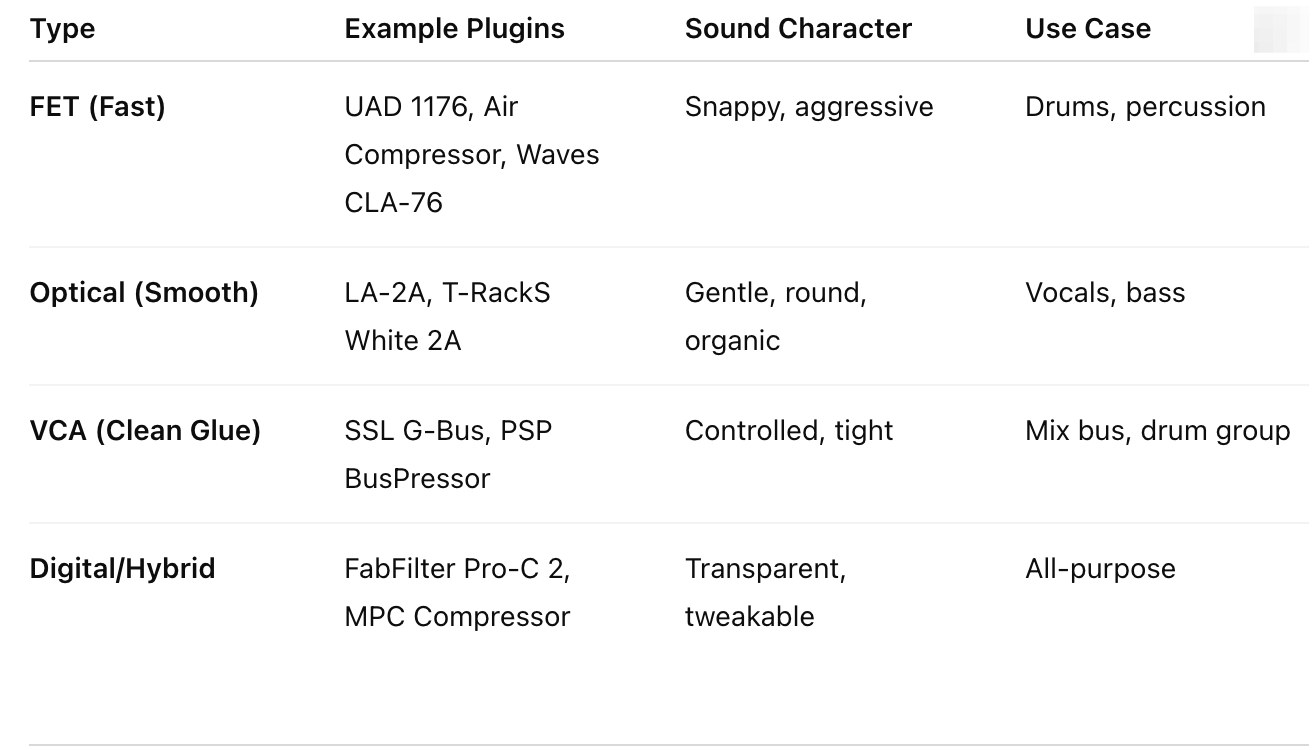
FET (Fast)UAD 1176, Air Compressor, Waves CLA-76Snappy, aggressive Best for Drums, percussion
Optical (Smooth)LA-2A, T-RackS White 2AGentle, round, organic, Best for Vocals, bass
VCA (Clean Glue)SSL G-Bus, PSP BusPressorControlled, tight
Best for Mix bus, drum group
Digital/HybridFabFilter Pro-C 2, MPC Compressor Transparent, tweakable Best All-purpose
Step 4 — Dial In the Settings (Start Here)
A real-world starting point:
Ratio: 8:1 to 20:1 (yes, slam it)
Attack: Medium-slow (10–30 ms) to let transients breathe
Release: Fast (50–150 ms) so the signal “pumps” musically
Threshold: Lower until you see ~10–20 dB reduction
Blend (Mix): 15–40 % wet depending on material
Then level-match the overall output so you’re not fooled by loudness.

Step 5 — Apply It Where It Counts
Drums:
Blend crushed compression (1176 style) underneath to make kicks and snares feel solid. Try bussing all drums together — not each individually.
Vocals:
Send to a separate compressor (LA-2A style). Drive it hard, then pull it under until you feel the words “stick” in the mix.
Bass or Synths:
Use a fast attack to grab peaks and a quick release to keep movement. Great for bringing out tone without adding distortion.
Full Mix Bus:
Very subtle. Low ratio (2:1 – 4:1), 1–2 dB reduction, then blend lightly (10–15 %). This is the “glue.”
Step 6 — Parallel vs Serial Compression
Serial compression = each compressor does a small amount in sequence.
Parallel compression = one does a lot on a duplicate, then gets blended.
You can use both — e.g., gentle vocal compression first, then a parallel smash underneath for tone.
Step 7 — Plugins That Shine in Parallel
AIR Compressor (MPC)
Clean, flexible, and with built-in Mix % — perfect for fast workflow.
UAD 1176 Classic Limiter
Industry gold for drum smack. Use “All Buttons In” for aggressive parallel blends.
Waves CLA-76 / Blue Stripe
Adds vintage color; great for midrange presence.
FabFilter Pro-C 2
Transparent control, built-in dry/wet, and lookahead for precise transient shaping.
Softube CL 1B / Tube-Tech
Smooth optical character — great for vocals and acoustic instruments.
MPC Native ‘Master’ or ‘Bus’ Compressor
Excellent for bus work; behaves similarly to SSL-style compression.
Step 8 — Common Mistakes
Over-blending until you lose dynamics.
Forgetting to level-match the result.
Compressing everything — pick one or two elements that benefit.
Using the same compressor on both paths (defeats tonal layering).
Step 9 — Workflow Example
Create Aux: Send drum bus → “Parallel Comp.”
Compressor: 1176 clone (Attack slow 5, Release fast 7).
Drive: 20 dB gain reduction.
Blend: Return -12 dB below dry drums.
Check: Bypass to compare — it should feel fuller, not just louder.
Mix Feedback
Want to see if your parallel compression is helping or hurting your mix?

Looking to test your parallel compression chain?
Try it on my curated Drum & Tone Sample Packs — made specifically for compression and saturation testing.
👉 Download Sample Packs
Related Posts + Next Steps
Final Thought:
Parallel compression should never sound like compression — it should feel like confidence. When you get the balance right, your mix doesn’t just sound louder — it feels alive.